How Much eSIM Data Do You Need? A Practical Guide to Choosing a Sim Local Plan
Buying travel data should not feel like guessing how much luggage you will bring home. Yet choosing between 3GB, 10GB, 20GB, and unlimited can be surprisingly difficult when every plan looks reasonable.
Explore the guide
The easiest way to decide is to start with your own habits, estimate how those habits will change during the trip, and add a sensible margin. That produces a more useful answer than a universal claim that everyone needs a certain number of gigabytes per week.
Sim Local offers several package types, including fixed-data bundles and unlimited-labelled products with different high-speed allowances. Understanding your usage helps you choose between them without overpaying or spending the holiday watching a data counter.
This guide walks through the calculation, the activities that change it, and the settings that help your allowance last.
Affiliate disclosure: We may earn a commission if you purchase through our links, at no extra cost to you.
Start with Three Numbers
You need an estimate of your daily mobile usage, the number of days you need service, and a buffer for unexpected activity.
A useful planning formula is:
Daily data estimate × travel days × buffer multiplier = target allowance.
For example, assume 0.5GB per day for ten days, then add a 25% buffer. The calculation is 0.5 × 10 × 1.25 = 6.25GB. A package above that target gives you room for normal variation.
The 0.5GB and 25% figures are illustrative assumptions, not measured averages for every traveller. Replace them with numbers that reflect your phone use and your comfort with topping up.
This is a starting budget. It becomes more useful once you account for video, large uploads, hotspot sharing, and the amount of Wi-Fi you realistically expect to use.
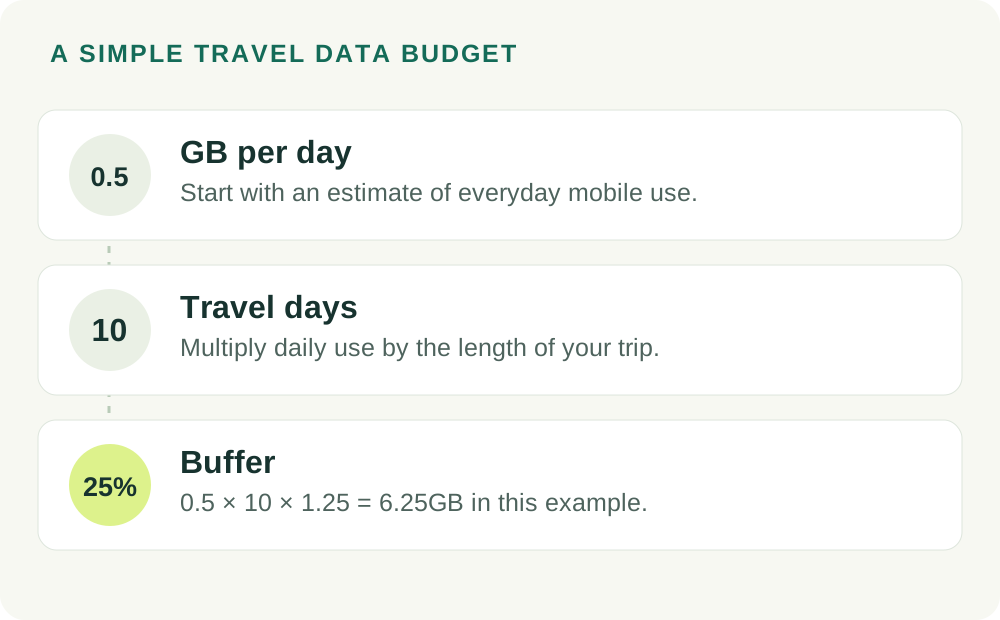
Travel data calculator
Use an estimate of daily mobile data, then allow some breathing room. This is a planning calculation, not a package recommendation.
Check Your Existing Mobile-Data History
Your phone can show which apps consume mobile data. Review a representative period rather than relying on memory, because background activity is easy to overlook.
On an iPhone, look under Settings and then Cellular, Mobile Data, or Mobile Service, depending on the interface. Check the dates associated with the statistics; a current-period counter may cover far longer than one month if it has not been reset.
On Android, search Settings for data usage and select the relevant SIM and date range. Menu names vary by manufacturer, so focus on finding the mobile-data total and the app breakdown.
If the period is 30 days and the phone used 9GB, the simple daily average is 0.3GB. That does not automatically become your travel budget, but it gives you a grounded place to begin.
Use your carrier's or provider's account information for the authoritative remaining allowance. Phone counters are useful for understanding behaviour, but their measurement periods and accounting can differ from the plan's records.
Adjust for What Changes on Holiday
At home, you may spend much of the day on familiar Wi-Fi. On holiday, the same browsing habits can move onto mobile data while you navigate, wait for transport, or explore outside.
You might also upload more photos, share more video, and use translation or travel apps more frequently. Those changes matter even if your normal monthly usage is modest.
On the other hand, a relaxed trip can reduce data use. Downloaded entertainment, offline information, and less screen time may make a small plan perfectly comfortable.
Build the estimate around the actual holiday. A conference week, beach break, rail journey, and remote-work stay should not all receive the same automatic allowance.
What Uses the Most Travel Data?
Video Streaming
Streaming quality can change consumption dramatically. Netflix estimates that HD viewing can use up to 3GB per hour under its relevant high-quality setting. That makes a single evening of streaming more significant than many basic travel tasks.
Lower quality or downloaded episodes can reduce the amount of mobile data needed. Check the app's settings instead of assuming it will automatically choose a low-data mode abroad.
Netflix's data controls are explained here: https://help.netflix.com/en/node/87
Social Video and Photo Sharing
Short videos can feel harmless because each clip is brief, but continuous scrolling adds up. Autoplay keeps transferring data even when you did not deliberately choose a long video.
Photo uploads also depend on file size and settings. Sharing a few compressed images is different from backing up hundreds of full-resolution photos and long video clips to the cloud.
Video Calls and Online Meetings
Video calls use data in both directions. Resolution, the number of participants, screen sharing, and the app's adaptive quality settings affect the total.
If meetings are central to the trip, measure a typical session before departure. That gives you a better planning figure than treating every video call as the same size.
Cloud Backups and Software Updates
Background tasks are the quiet budget-breakers. A phone may upload the day's photos while a connected laptop downloads an update you did not remember scheduling.
Check those settings before travelling. Restrict large backups and updates to an appropriate Wi-Fi connection unless you deliberately budgeted mobile data for them.
Maps, Messages, and Everyday Browsing
These activities can be manageable on a modest allowance, especially when media attachments and autoplay are controlled. However, there is no fixed universal consumption rate for a navigation session or a browsing hour.
Use your app history to identify what actually happens on your phone. The same app can behave differently depending on downloaded content, image quality, and background activity.
Three Example Data Budgets
These scenarios illustrate a method. They are not promises that a particular allowance will suit everyone with the same itinerary.
Example One: A Seven-Day Sightseeing Holiday
Assume you expect to use 0.3GB daily for messages, directions, bookings, and light browsing. Seven days gives a base estimate of 2.1GB.
Adding a 30% buffer produces 2.73GB. A 3GB package could be a reasonable starting comparison if the validity fits and a practical refill option is available.
If you prefer more flexibility or expect extra social media use, compare the next size up. The right choice depends on the price difference and how comfortable you are monitoring usage.
Example Two: A Two-Week Active Holiday
Assume 0.8GB per day because you expect more photo sharing, browsing, and occasional video calls. Fourteen days produces an estimate of 11.2GB.
Adding 25% gives 14GB. A package around 15GB or above becomes a sensible comparison point, depending on the available plans.
If the available choices are 10GB and 20GB, compare the larger bundle with the smaller one plus a likely top-up. Include the refill's validity and convenience, not just its price.
Example Three: A Ten-Day Working Trip
Suppose your measured mobile work routine suggests 2GB a day, including occasional hotspot use. Ten days gives 20GB before adding any margin.
With a 25% buffer, the target becomes 25GB. You could compare a larger fixed package with a suitable daily high-speed plan, while keeping dependable Wi-Fi or another connection available for important meetings.
If one day involves a large file transfer, examine that day separately. A comfortable average can hide a peak that exceeds a daily threshold.
Fixed Data or Unlimited: Which Is Better?
A Fixed Bundle Gives You a Total Bucket
With a fixed-data package, the central question is whether the total allowance covers your trip before the validity ends. You may use more on one day and less on another, within the product's conditions.
That can suit uneven usage. For example, a traveller might upload a large batch of work on one afternoon and use little data during the next two days.
The trade-off is the overall limit. Once the bucket is used, you need the plan's supported refill or another suitable purchase to continue at the required service level.
An Unlimited-Labelled Plan Often Has a Daily High-Speed Threshold
Unlimited data does not necessarily mean unrestricted full-speed use all day. Many travel packages provide a stated amount of fast data, followed by a reduced-speed period.
That format can be useful if your usage is consistently high but remains within the daily allowance. It is less straightforward when several days of consumption are concentrated into one very busy day.
For Sim Local, read the selected product's fair-use conditions. Different packages have different thresholds, and an allowance described on a general promotional page should not replace the package details.
Do not assume unused daily high-speed data rolls forward. If the terms do not provide rollover, budget each day independently.
How Hotspot Sharing Changes the Calculation
Your phone's hotspot shares the same mobile connection with other devices. It does not create a second data allowance.
If two travellers share one plan, add both people's expected use. Then include any tablet or laptop activity. A plan sized for one phone can feel surprisingly small once several devices connect.
For example, assume your own phone uses 0.4GB a day and a companion uses another 0.4GB. Across ten days, that is 8GB before a buffer, even before connecting a laptop.
The practical limitations matter too. Everyone sharing the connection needs to remain within hotspot range, and the hotspot phone must have sufficient battery and reception.
Separate eSIMs can be more convenient when travellers split up. One shared purchase may be cheaper, but independent connections can make meetings, directions, and communication easier.
Data Allowance and Validity Are Different Limits
A plan can have plenty of data left and still expire. Conversely, it can have time remaining after the data is exhausted.
Check both limits before purchase. A 30-day package may suit a two-week trip even if you do not use every day, while a cheaper seven-day option may require a second purchase.
Read when the validity starts. The purchase date, installation date, first connection, and automatic activation deadline are different events, and the selected package determines which ones matter.
For daily allowances, check when the daily reset occurs if the information is available. Do not automatically assume it follows midnight in your current time zone.
How to Use Less Data Without Spoiling the Trip
Download Entertainment Before Departure
Save playlists, podcasts, and supported video downloads on a dependable connection. Open a few files offline before leaving to confirm they are actually available.
Remember that downloads can have expiry or account requirements. Check the relevant app if you are preparing content well before the trip.
Save Maps and Key Travel Details
Offline maps reduce dependence on mobile data, but features vary by app. Google Maps, for example, does not provide offline walking, cycling, or public-transport directions, so a downloaded area is not a complete replacement for every online function.
Keep accommodation addresses, important booking information, and essential route details separately available. That helps when either data or reception is temporarily unavailable.
Adjust Media Quality
Lower streaming quality when a high-resolution image is not necessary. On a phone screen, a modest quality setting may be a comfortable trade-off for a smaller data purchase.
Turn off unnecessary autoplay where the app allows it. Choosing what you actually want to watch is often more useful than paying for videos that play while you scroll past.
Pause Large Background Tasks
Set photo backups, app updates, and large cloud syncs to wait for Wi-Fi when appropriate. Review the connected laptop as well as the phone.
If a work application needs continuous syncing, budget for it deliberately. The goal is to control avoidable transfers without interrupting something you genuinely need.
Review Usage Early in the Trip
Check the first full day's consumption. If it is much higher than expected, identify the app or activity responsible before several more days pass.
A simple midpoint check is useful too. If half the holiday remains but most of the allowance is gone, arrange a suitable refill or adjust the high-data activities while you still have a connection.
How to Choose the Sim Local Package
First, choose the correct coverage area. A perfect data amount is useless if the plan does not include your destination or side trip.
Next, match the validity to your actual travel dates. Then compare your estimated total with fixed bundles and your busiest day with daily high-speed products.
Add any calling requirement. If you need a native number and ordinary calls, choose a package that explicitly includes them. A data estimate alone cannot determine that part of the purchase.
Finally, check hotspot permission and refill options. Some Sim Local products can be topped up through Sim Local, while others use operator-specific processes or require another purchase.
Try ESIMDUDE10 for 10% off an eligible purchase once you have selected the right package. Confirm the discount at checkout rather than increasing the plan size just to increase the saving.
What If You Run Out of Data?
Open the plan's management page or app and check the remaining allowance and expiry. The next step depends on whether you used the total bucket, reached a daily threshold, or simply reached the end of the validity period.
If a supported top-up is available, read what it adds and when it starts. Make sure it covers the remaining dates and destinations before purchasing.
Do not delete the installed eSIM as a way to refresh the allowance. Deleting the profile does not create more data and may make recovery difficult.
If the connection stops despite an available balance, use the troubleshooting guide: Sim Local troubleshooting guide
Travel Data FAQs
Is 1GB enough for a week?
It can be enough for very restrained use, but it leaves little room for media and unexpected background activity. Check your history and the refill options before choosing such a small allowance.
Is 10GB enough for two weeks?
It may be, depending on your habits. Divide the allowance by the trip length to see the average daily budget, then compare that with your expected usage and any high-data days.
Does 5G use more data than 4G?
The content and settings determine the amount transferred. A faster connection can encourage higher-quality streaming or more downloads, so usage may rise indirectly even though the same file is still the same size.
Do WhatsApp calls use the eSIM's data?
When the app is using the travel mobile-data connection rather than Wi-Fi, its traffic counts toward the relevant allowance. Voice and video calls have different consumption patterns.
Buy Enough for Your Trip, with Room to Breathe
Use your own history, adjust for travel, and add a practical buffer. Then compare the total allowance, daily high-speed limits, validity, and refill process together.
That approach produces a much better purchase than automatically choosing unlimited or buying the smallest available package. You get enough connectivity for the holiday without turning the data plan into another thing to worry about.
Try ESIMDUDE10 for 10% off an eligible purchase. Confirm the discount before payment.
ESIMDUDE10